> For the complete documentation index, see [llms.txt](https://support.dlink.com.sg/llms.txt). Markdown versions of documentation pages are available by appending `.md` to page URLs; this page is available as [Markdown](https://support.dlink.com.sg/consumer/wi-fi-router/r15/faqs/r15-how-to-setup-parental-control.md).
# R15-How to setup parental control
{% stepper %}
{% step %}
### Connect your device to the Wi-Fi of the R15 router.
{% endstep %}
{% step %}
### Open a browser and type or then press Enter
*\*XXXX Last 4 digit of the router’s mac address*
{% endstep %}
{% step %}
### Enter your administrator password.
If you have not changed the default password, check on the configuration card. Click Login.
{% endstep %}
{% step %}
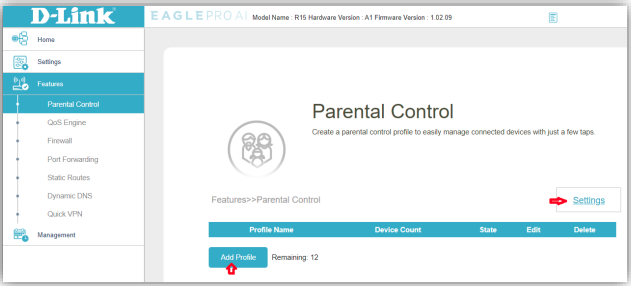
### Go to Features > Parental Control
* Click Settings
* Click Add Profile
{% endstep %}
{% endstepper %}
#### Schedule Type: Choose Any
* Set a schedule to allow/block devices in the profile
* Restrict internet access during bedtime
* Slow Internet Access for clients in restricted hours
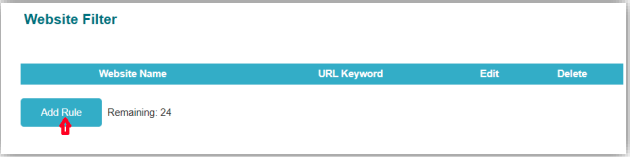
#### Website Filter
* Scroll down to Website Filter section
* Add Rule
* Put the desired website and hit apply
* List of domains for filter will appear
* Scroll up and hit save
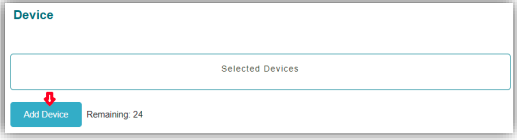
#### Add Device
* Scroll down to Device section
* Click Add Device
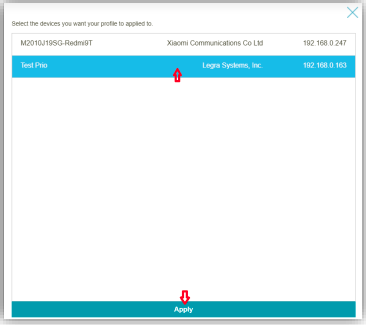
* Select the device you want to put in Parental Control.
* Click Apply
* List of Selected Devices will appear
* Scroll up and click Save