> For the complete documentation index, see [llms.txt](https://support.dlink.com.sg/llms.txt). Markdown versions of documentation pages are available by appending `.md` to page URLs; this page is available as [Markdown](https://support.dlink.com.sg/consumer/wi-fi-router/r15/faqs/r15-how-to-reset-the-router.md).
# R15-How to reset the router
{% stepper %}
{% step %}
### Connect your device to the Wi-Fi of the R15 router.
{% endstep %}
{% step %}
### Open a browser and type or then press Enter
*\*XXXX Last 4 digit of the router’s mac address*
{% endstep %}
{% step %}
### Enter your administrator password.
*If you have not changed the default password, check on the configuration card. Click Login.*
{% endstep %}
{% step %}
### Go to Management > System Admin > System
i. Put your desired admin password in the Password box
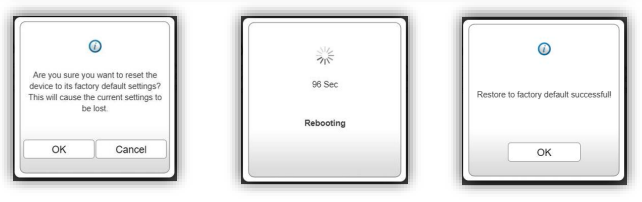
ii. Click **Restore** Button
iii. Click OK
iv. Wait for the countdown
v. Restore to factory default successful
Please note that restoring the settings to the factory defaults will erase all settings, including any rules you have created
{% endstep %}
{% endstepper %}
Reset Pin hole
1. Keep the router powered on
2. Insert a paperclip in the hole
3. Wait for the power LED turns orange (all other LEDs should be off)
4. Release to reset the router to default settings.
Please note that restoring the settings to the factory defaults will erase all settings, including any rules you have created