> For the complete documentation index, see [llms.txt](https://support.dlink.com.sg/llms.txt). Markdown versions of documentation pages are available by appending `.md` to page URLs; this page is available as [Markdown](https://support.dlink.com.sg/consumer/wi-fi-router/m15/faqs/m15-how-many-eagle-pro-ai-mesh-extenders-can-i-add-into-my-network.md).
# M15: How many EAGLE PRO AI mesh extenders can I add into my network
It is best to connect one mesh router to up to three mesh extenders. However, depending on\
what models you choose and how they are connected, we have different recommended\
installations. Please check the following images and tables for more details.
#### Star Network:
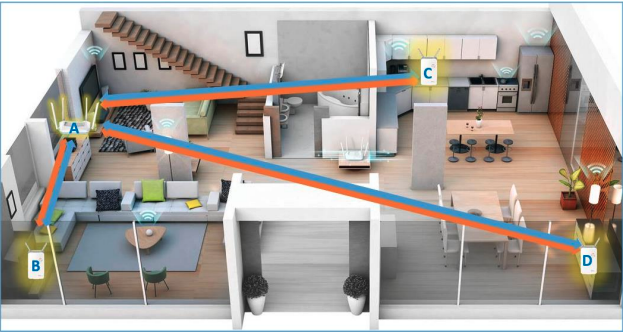
Under the star network, the EAGLE PRO AI mesh network allows you to have one mesh router\
and up to three compatible mesh nodes. Depending on the product models, we recommend\
you install your mesh devices as per the following guidelines.
#### Daisy-Chain Network:
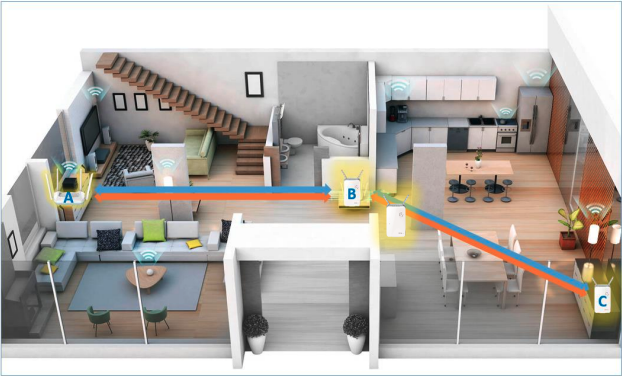
By contrast, in the daisy-chain topology, mesh nodes are connected to one another, which\
means Wi-Fi signals might have to make multiple “hops” before they reach a particular device.\
Depending on the product models, we recommend you install your mesh devices as per the\
following guidelines.
#### **Note:**
1. You can connect the mesh devices with or without Ethernet cables.
2. A hybrid network (combination of star and daisy-chain topologies) is not recommended.
After you locate your mesh nodes, check out the topology using your EAGLE PRO AI app to\
make sure the connection among each node is optimized. To find out how your mesh nodes\
are connected, please follow the steps below:
{% stepper %}
{% step %}
### Launch the EAGLE PRO AI app and sign in with your account.
{% endstep %}
{% step %}
### Tap to choose the main router from the device list.
{% endstep %}
{% step %}
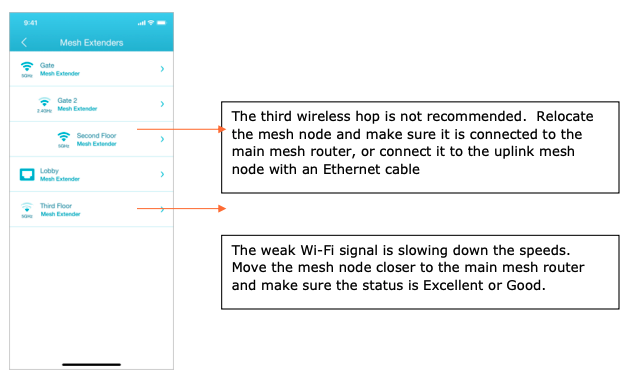
Tap the extender icon. All your mesh extenders display. If you find multiple wireless\
hops, or weak Wi-Fi signals, relocate the mesh node or use wired Ethernet as the backhaul for better performance.
Note: If you cannot find the add-on mesh extender, the mesh extender is losing connection with the mesh router. Check if the power is turned on or move the mesh extender closer to the mesh router.
{% endstep %}
{% endstepper %}