> For the complete documentation index, see [llms.txt](https://support.dlink.com.sg/llms.txt). Markdown versions of documentation pages are available by appending `.md` to page URLs; this page is available as [Markdown](https://support.dlink.com.sg/consumer/wi-fi-router/m15/faqs/m15-how-do-i-manually-update-the-firmware-on-my-eagle-pro-ai-device.md).
# M15: How do I manually update the firmware on my EAGLE PRO AI device
Device’s firmware is released to improve product performance, add features, or enhance\
security. By default, your device’s firmware will be updated automatically whenever new\
firmware becomes available for your device. If you want to load a specific firmware version,\
follow the steps below:
{% stepper %}
{% step %}
Connect your PC to the router via the Ethernet cable or Wi-Fi, and then log in to the\
router
{% endstep %}
{% step %}
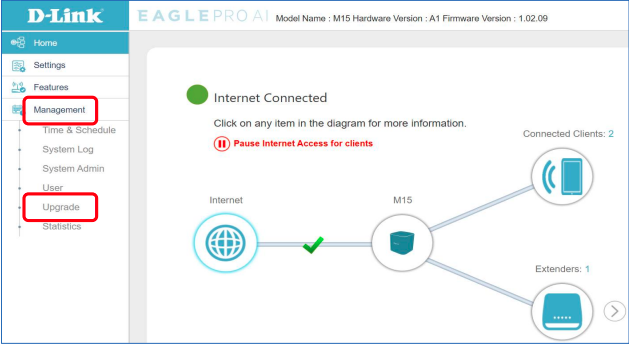
### Click Management -> Upgrade.
{% endstep %}
{% step %}
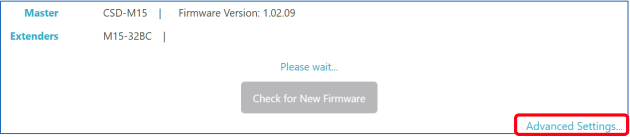
### Click Advanced Setting to perform the manual firmware upgrade.
{% endstep %}
{% step %}
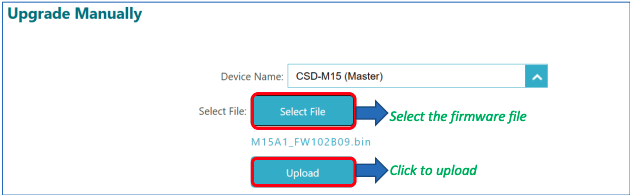
### Select the device from the Device Name drop-down list.
{% endstep %}
{% step %}
Click **Select File** to choose the firmware from your computer, and then click **Upload** to\
perform the manual firmware upgrade.
**Warning**: After you click the **Upload** button, do not try to go online, turn off the device, or do\
anything else to the router until the updating process is complete.
{% endstep %}
{% step %}
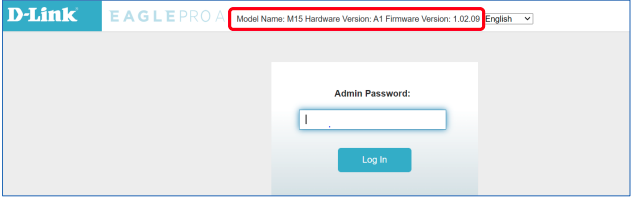
To verify if your device is running the specific firmware version, check the version on the\
top.
{% endstep %}
{% endstepper %}