> For the complete documentation index, see [llms.txt](https://support.dlink.com.sg/llms.txt). Markdown versions of documentation pages are available by appending `.md` to page URLs; this page is available as [Markdown](https://support.dlink.com.sg/consumer/wi-fi-router/m15/faqs/m15-how-do-i-configure-quality-of-service-qos-using-the-eagle-pro-ai-app.md).
# M15: How do I configure Quality of Service (QoS) using the EAGLE PRO AI app
The QoS feature lets you prioritize internet traffic for applications and devices to minimize the\
impact of bandwidth congestion. Client devices with higher priority will be performing better with\
lower latency, when total internet traffic usage is greater than available bandwidth.
\
To set up the QoS feature, please follow the steps below:
{% stepper %}
{% step %}
### Launch the EAGLE PRO AI app and then log in with your D-Link account.
{% endstep %}
{% step %}
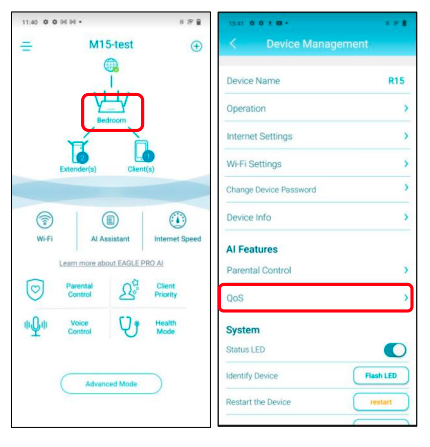
Tap to choose the device you would like to configure. Tap the router icon and the tap\
QoS.
{% endstep %}
{% step %}
### Enable the AI Traffic Optimizer, then run the Internet speed test as instructed.
{% endstep %}
{% step %}
### The upload and download speeds display. Tap Apply.
{% endstep %}
{% step %}
The QoS feature has been enabled. By default, the QoS engine prioritizes your client\
devices and data based on the speed test results. You can also manually configure the\
download and upload speeds.
{% endstep %}
{% step %}
### Tap Client Priority.
{% endstep %}
{% step %}
Select a client device from the list, then assign a priority (High/Low) and the duration\
period (Always/1 day/4 hours/2 hours/1 hour).
{% endstep %}
{% step %}
### Tap < to apply the settings
{% endstep %}
{% endstepper %}