> For the complete documentation index, see [llms.txt](https://support.dlink.com.sg/llms.txt). Markdown versions of documentation pages are available by appending `.md` to page URLs; this page is available as [Markdown](https://support.dlink.com.sg/consumer/wi-fi-router/m15/faqs/m15-how-do-i-change-the-wireless-setting-on-my-d-link-routers-or-range-extenders.md).
# M15: How do I change the wireless setting on my D-Link routers or range extenders
The EAGLE PRO AI app allows you to manage your Wi-Fi settings with ease. To change the\
SSID, password or other settings for your Wi-Fi network, please follow the steps below:
{% stepper %}
{% step %}
### Launch the EAGLE PRO AI app and log in with your D-Link account.
{% endstep %}
{% step %}
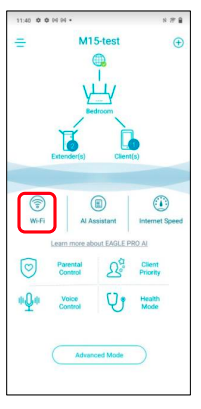
Tap the device you’d like to configure. Then, tap **Wi-Fi**.
{% endstep %}
{% step %}
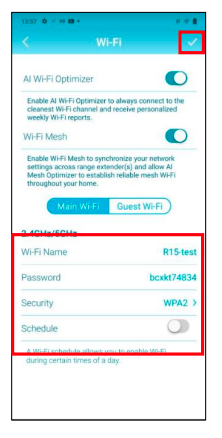
### Change your Wi-Fi configurations. Then, tap ✓ to apply the settings.
Note: If your device disconnects from the wireless network, view the available wireless network again and connect to your Wi-Fi network.
{% endstep %}
{% endstepper %}