> For the complete documentation index, see [llms.txt](https://support.dlink.com.sg/llms.txt). Markdown versions of documentation pages are available by appending `.md` to page URLs; this page is available as [Markdown](https://support.dlink.com.sg/consumer/wi-fi-router/dir-x1560/faqs/dir-x1560-how-to-set-up-dir-x1560-singapore-singapore-telco-using-d-link-wifi-app.md).
# DIR-X1560-How to set up DIR-X1560 Singapore (Singapore Telco)–Using D-Link Wifi App
{% stepper %}
{% step %}
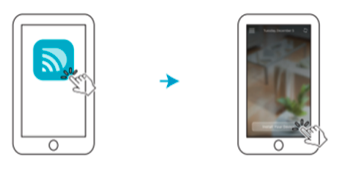
### Download the D-Link Wi-Fi app from App store.
{% endstep %}
{% step %}
### Launch the D-Link Wi-Fi app
{% endstep %}
{% step %}
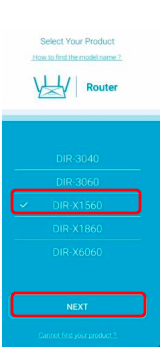
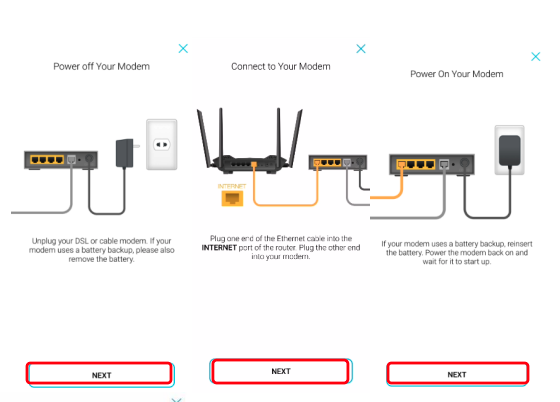
### Simply follow the on-screen instructions to complete the installation and the configuration process.
(1) Select **DIR-X1560** from the list and tap **NEXT**.\
(2) Setup up New Network
{% endstep %}
{% step %}
### Simply follow the on-screen instructions to complete the installation and the configuration process.
{% endstep %}
{% step %}
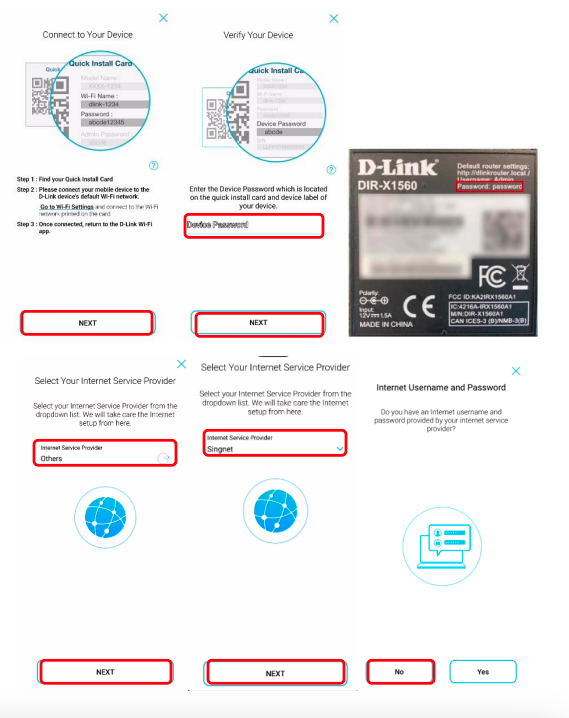
### Please make sure phone is connect to router Wi-Fi
{% endstep %}
{% step %}
### Enter the device default password which located at the bottom of the device
{% endstep %}
{% step %}
**Important**: Select the Internet Service Provider and choose **Other** (Singtel ONR, Starhub, M1,\
ViewQuest, MyRepublic,WhizComms) if the ISP was not in the list.
**Important**: Select the Internet Service Provider and choose **Singnet** if you are using **Singtel**\
**ONT**.
Select **NO** if don’t have ISP username and password
{% endstep %}
{% step %}
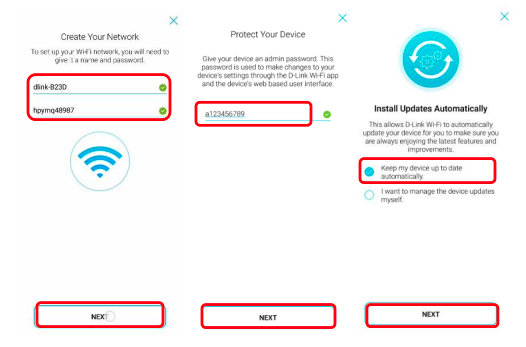
### Create your own Wi-Fi name and password
{% endstep %}
{% step %}
### Set the device new “password”
{% endstep %}
{% step %}
### Choose firmware upgrade automatically and click Next
{% endstep %}
{% step %}
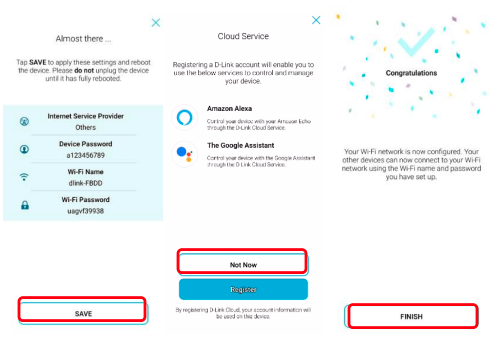
### Check the cover setting and click save
{% endstep %}
{% step %}
### Choose the Not Now for cloud service if don’t have amazon alexa and google assistant.
{% endstep %}
{% step %}
### Click finish after device completed setup
{% endstep %}
{% endstepper %}