> For the complete documentation index, see [llms.txt](https://support.dlink.com.sg/llms.txt). Markdown versions of documentation pages are available by appending `.md` to page URLs; this page is available as [Markdown](https://support.dlink.com.sg/consumer/wi-fi-router/dir-895l/faqs/how-to-setup-dir-895l-for-tm-and-maxis-my.md).
# How to Setup DIR-895L for TM and Maxis? (MY)
{% stepper %}
{% step %}
### Connect Your PC (Laptop) to the Router (Port 1) using Network cable.
{% endstep %}
{% step %}
Launch your browser (Google Chrome) and key in 192.168.0.1 in the address\
column and press Enter
{% endstep %}
{% step %}
### Enter Password: \. Click on Log In
{% endstep %}
{% step %}
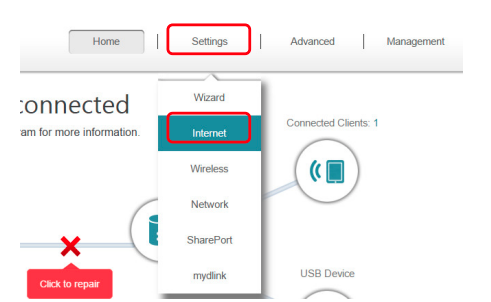
### Go to Settings > Internet.
{% endstep %}
{% step %}
### Choose the PPPoE, key in PPP Username and Password.
{% endstep %}
{% step %}
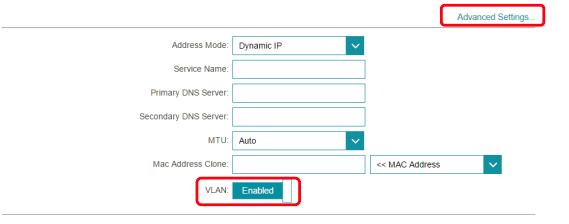
### Click Advanced Settings and Enable the VLAN.
Change the following **VLAN ID** as below:
#### **For Unifi VLAN**
**Internet: 500**\
**IPTV: 600**\
**VOIP: 400**
#### **For Maxis VLAN**
**Internet: 621**
Click **Save** after done with configuration.
{% endstep %}
{% step %}
Choose the **IPTV** from **Wan Connection**, and plug in the cable to **LAN Port 4** for\
IPTV.
{% endstep %}
{% endstepper %}