> For the complete documentation index, see [llms.txt](https://support.dlink.com.sg/llms.txt). Markdown versions of documentation pages are available by appending `.md` to page URLs; this page is available as [Markdown](https://support.dlink.com.sg/consumer/wi-fi-router/dir-890l/faqs/how-do-i-setup-website-filtering-on-my-router.md).
# How do I setup website filtering on my router?
**Important Note: You CANNOT block Secure HTTP (HTTPS) websites**
{% stepper %}
{% step %}
### Log into your router
**New GUI** \
Blue and White
**Note:** *Website filtering **cannot** be applied to specific devices only. Website filtering will apply to the **entire network**.*
{% endstep %}
{% step %}
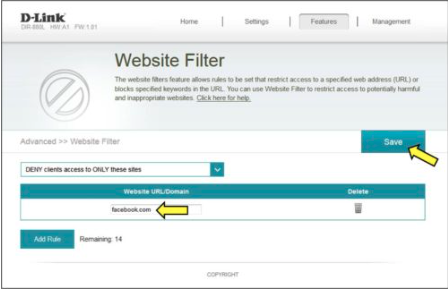
### Click Features > Website Filter
{% endstep %}
{% step %}
### Click Add Rule
{% endstep %}
{% step %}
### Add your desired website(s) to block and click Save
**Note:** *You cannot block Secure HTTP (HTTPs) websites.*
Your website(s) are now blocked
{% endstep %}
{% endstepper %}