# How do I enable remote management on my router?

{% stepper %}
{% step %}

### Log into your router

**New GUI**\
White and Blue
{% endstep %}

{% step %}

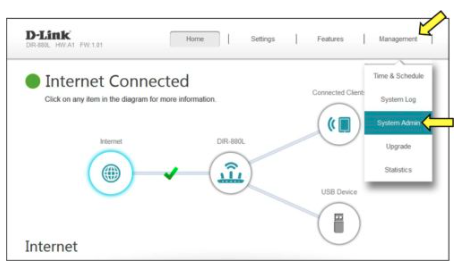
### Click Management > System Admin

<figure><img src="https://4142062250-files.gitbook.io/~/files/v0/b/gitbook-x-prod.appspot.com/o/spaces%2FAsNvP4j1V0u2MDOjtqo2%2Fuploads%2F4ENQnmFjHatlhaCr4dyG%2FScreenshot%202026-03-10%20at%201.47.54%E2%80%AFPM.png?alt=media&#x26;token=4de05057-c972-4841-8ff4-9b73aca53e3f" alt=""><figcaption></figcaption></figure>

{% endstep %}

{% step %}

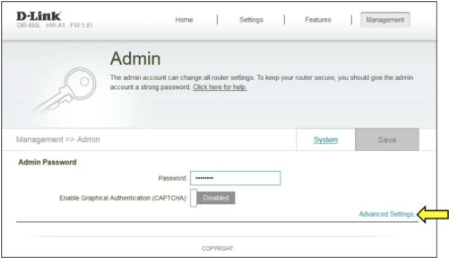
### Click Advanced Settings

<figure><img src="https://4142062250-files.gitbook.io/~/files/v0/b/gitbook-x-prod.appspot.com/o/spaces%2FAsNvP4j1V0u2MDOjtqo2%2Fuploads%2Fnr3l2w10wJNiwaGjX4M0%2FScreenshot%202026-03-10%20at%201.48.24%E2%80%AFPM.png?alt=media&#x26;token=1d271031-7574-4d82-a389-94b15fe18115" alt=""><figcaption></figcaption></figure>

{% endstep %}

{% step %}

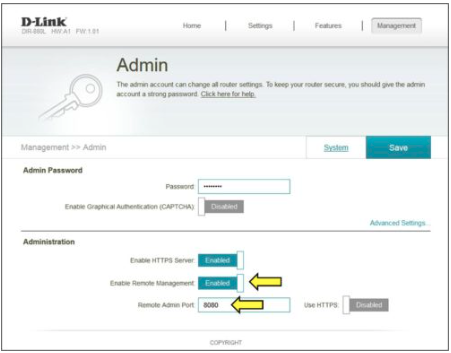
### Enable Remote Management

– Check to Enable\
– Enter Remote Admin Port (or use default 8080)

– Click **Save**

<figure><img src="https://4142062250-files.gitbook.io/~/files/v0/b/gitbook-x-prod.appspot.com/o/spaces%2FAsNvP4j1V0u2MDOjtqo2%2Fuploads%2FKrwd0XtFt3F08bUgB8zW%2FScreenshot%202026-03-10%20at%201.48.57%E2%80%AFPM.png?alt=media&#x26;token=70c27a80-5381-4b22-9a4c-7f98804ddcd6" alt=""><figcaption></figcaption></figure>

To access your router remotely, from a web browser enter: http\://\<your wanip>:8080

e.g. <http://172.16.100.56:8080>

You can find your WAN IP by clicking on the Home tab. It will be displayed under the Internet Section

<figure><img src="https://4142062250-files.gitbook.io/~/files/v0/b/gitbook-x-prod.appspot.com/o/spaces%2FAsNvP4j1V0u2MDOjtqo2%2Fuploads%2FRWSB9t78x9LYaJ2wLPQg%2FScreenshot%202026-03-10%20at%201.49.22%E2%80%AFPM.png?alt=media&#x26;token=ab7d3f35-8cf5-43ea-80a3-98cc4cbc6f9a" alt=""><figcaption></figcaption></figure>

{% endstep %}
{% endstepper %}