> For the complete documentation index, see [llms.txt](https://support.dlink.com.sg/llms.txt). Markdown versions of documentation pages are available by appending `.md` to page URLs; this page is available as [Markdown](https://support.dlink.com.sg/consumer/wi-fi-router/dir-890l/faqs/how-do-i-create-schedules-on-my-router.md).
# How do I create schedules on my router?
The schedule configuration section is used to specify “Operational times” for various firewall and parental control features. This will allow you to set a time restriction on when network access is available.
**Note:** *Ensure the correct time has been configured on the router*
{% stepper %}
{% step %}
### Log into your router
**New GUI** \
Blue and White
{% endstep %}
{% step %}
### Click on the Maintenance > Time & Schedule
{% endstep %}
{% step %}
### Click the Schedule Tab
{% endstep %}
{% step %}
### Click Add Rule
{% endstep %}
{% step %}
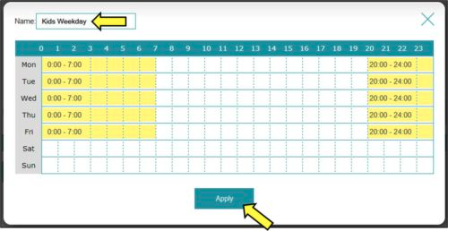
### Create your Schedule and click Apply
**Note:** *This example shows a schedule of Monday-Friday from 8pm-7am.*
{% endstep %}
{% endstepper %}