> For the complete documentation index, see [llms.txt](https://support.dlink.com.sg/llms.txt). Markdown versions of documentation pages are available by appending `.md` to page URLs; this page is available as [Markdown](https://support.dlink.com.sg/consumer/wi-fi-router/dir-890l/faqs/how-do-i-configure-shareport-mobile-on-my-router.md).
# How do I configure SharePort Mobile on my router?
**Note:** If using a D-Link Mobile router, SharePort Mobile is only compatible in Router and Wifi-Hotspot Mode
**Note:** *In this example we are using the DIR-506L, however, these instructions can be used on any D-Link router that supports SharePort Mobile*
{% stepper %}
{% step %}
### Insert your USB Flash Drive into your Router
{% endstep %}
{% endstepper %}
## **Router Configuration**
{% stepper %}
{% step %}
### Log into your router:
Open a web browser and enter the IP address of your router or enter . in the address bar. By Default the IP address is 192.168.0.1
The default the username is admin and there is no password
{% endstep %}
{% step %}
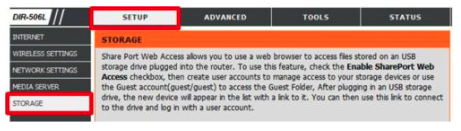
### Click on the Setup Tab and Click Storage on the left side
{% endstep %}
{% step %}
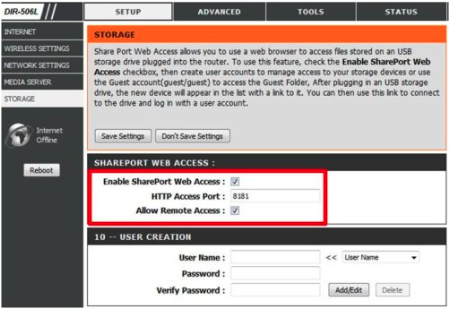
### Check Enable SharePort Web Access and ensure Allow Remote Access is checked, Click Save Settings
{% endstep %}
{% endstepper %}
## **Mobile Setup**
{% stepper %}
{% step %}
### Download the SharePort™ Mobile App from App Store (Apple/Android)
{% endstep %}
{% step %}
### Ensure your Mobile device is connected to the wireless signal of your SharePort™ Mobile supported router.
{% endstep %}
{% step %}
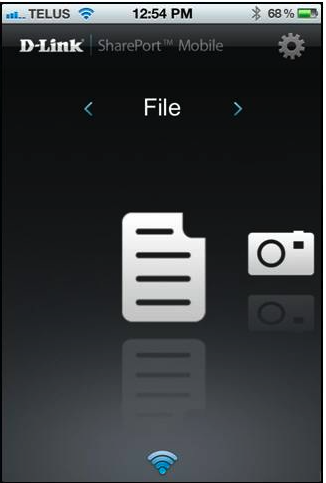
### Launch the SharePort™ Mobile App; The following screen will appear.
{% endstep %}
{% step %}
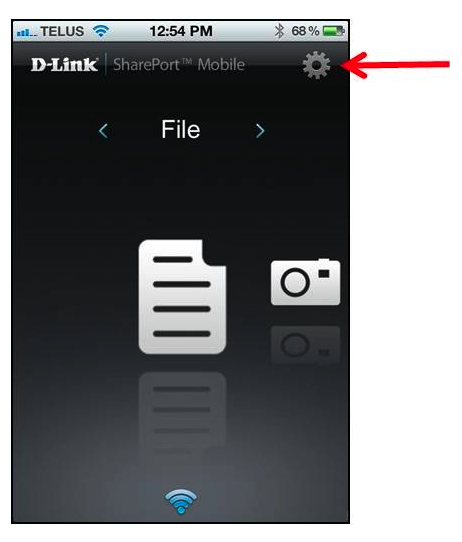
### Click Settings
{% endstep %}
{% step %}
### Click Edit and enter your username and password
**Note**: By default the username is set to admin with no password.
{% endstep %}
{% step %}
### Change the Port if required (by default it is configured at port 8181 within the router configuration
**Note:** If accessing content over the internet, enter the IP or Domain address of your router. if access locally, the IP will fill in automatically.
SharePort Mobile is successfully configured and your USB media should now be accessible.
{% endstep %}
{% endstepper %}