> For the complete documentation index, see [llms.txt](https://support.dlink.com.sg/llms.txt). Markdown versions of documentation pages are available by appending `.md` to page URLs; this page is available as [Markdown](https://support.dlink.com.sg/consumer/wi-fi-router/dir-885l/faqs/how-do-i-enable-remote-management-on-my-dir-885l-router.md).
# How do I enable remote management on my DIR-885L router?
{% stepper %}
{% step %}
### Log into your router
**New GUI**\
**White and Blue**
{% endstep %}
{% step %}
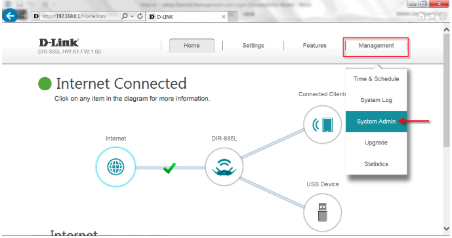
### Click Management > System Admin
{% endstep %}
{% step %}
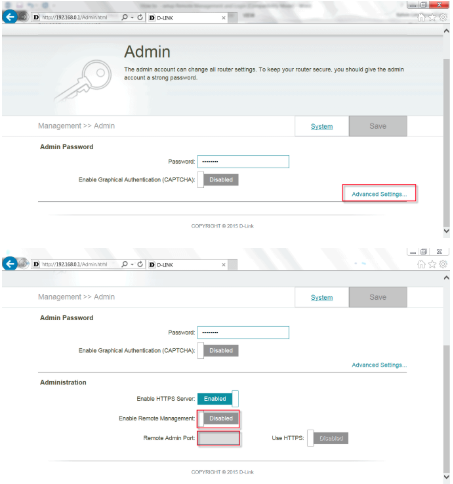
### Click Advanced Settings
{% endstep %}
{% step %}
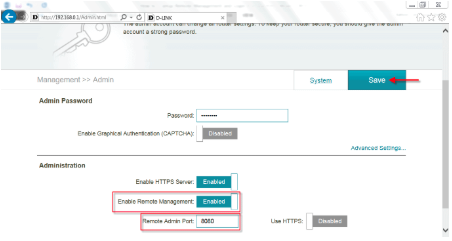
### Enable Remote Management
– Check to **Enable**\
– Enter **Remote Admin Port** (or use default 8080)
– Click **Save**
To access your router remotely, from a web browser enter: http\://\:8080
e.g.
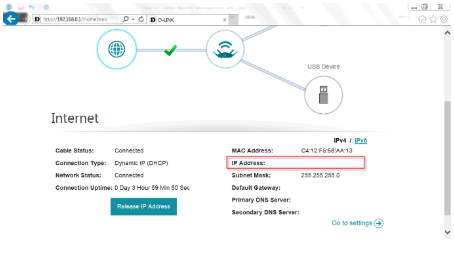
You can find your WAN IP by clicking on the Home tab. It will be displayed under the Internet Section next to **IP Address**
{% endstep %}
{% endstepper %}