> For the complete documentation index, see [llms.txt](https://support.dlink.com.sg/llms.txt). Markdown versions of documentation pages are available by appending `.md` to page URLs; this page is available as [Markdown](https://support.dlink.com.sg/consumer/wi-fi-router/dir-885l/faqs/how-do-i-configure-mac-address-filtering-on-my-dir-885l-router.md).
# How do I configure MAC address filtering on my DIR-885L router?
**How do I configure MAC address filtering on my DIR-885L router?**
**Note:** MAC Address filtering is used to control network access based on the MAC Address of the network adapter. This feature can be configured to ALLOW or DENY network/Internet access.
{% stepper %}
{% step %}
### Log into your router
**Blue and White**
**Important Note**: D-Link routers with the New Blue and White configuration interface **DO NOT SUPPORT** traditional MAC Address Filtering. however, you can manually block users once they connect to the network.
{% endstep %}
{% step %}
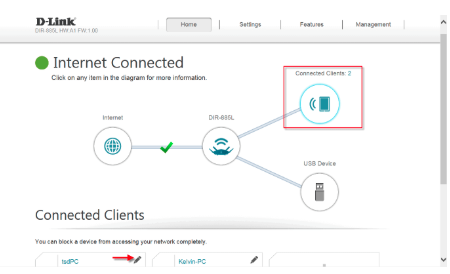
### From the Home Tab, click the Connected Clients Icon
{% endstep %}
{% step %}
### Under Connected Clients, click on the Pencil Icon next to the device you want to block
{% endstep %}
{% step %}
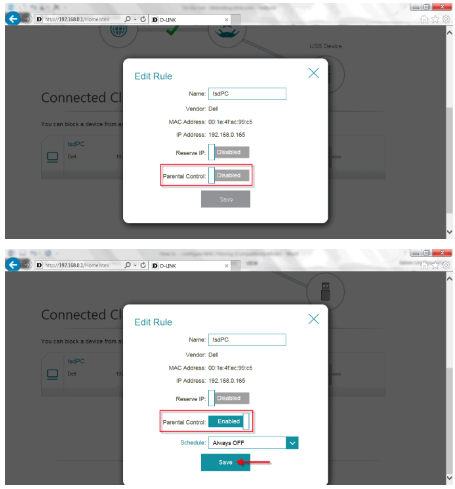
### Click on the Parental Control button to Enable It and Click Save
{% endstep %}
{% step %}
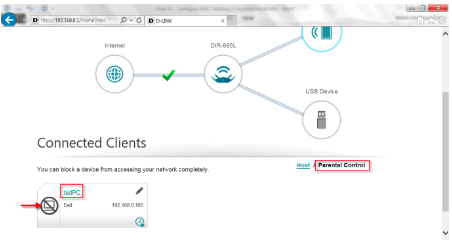
### The selected device is now blocked from your network
{% endstep %}
{% endstepper %}