> For the complete documentation index, see [llms.txt](https://support.dlink.com.sg/llms.txt). Markdown versions of documentation pages are available by appending `.md` to page URLs; this page is available as [Markdown](https://support.dlink.com.sg/consumer/wi-fi-router/dir-868l/faqs/how-do-i-enable-and-disable-remote-management-on-my-dir-868l-router.md).
# How do I enable and disable Remote Management on my DIR-868L router?
Example: Your router’s wireless performance may be affected by interference from other nearby routers. You can change the wireless channel to one which has less interference.
{% stepper %}
{% step %}
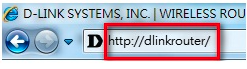
Open your Internet browser and enter , , or into the address bar.
{% endstep %}
{% step %}
Enter your login information in the fields provided. The default username is Admin. Enter your administrator password. If you have not changed the default password, leave this field blank. Clink Login.
{% endstep %}
{% step %}
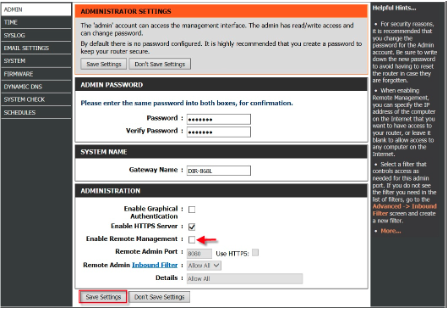
### Click on the TOOLS tab and navigate down to the ADMINISTRATION section.
{% endstep %}
{% endstepper %}
### **Enable Remote Management:**
{% stepper %}
{% step %}
### Check the box to Enable Remote Management.
{% endstep %}
{% step %}
### Enter the desired port in the Remote Admin Port dialogue box. You can leave the default port at 8080
– Click **Save Settings**
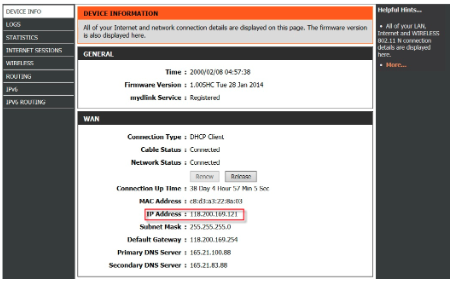
To access your router remotely, from a web browser enter: http\://\:8080
e.g.
You can find your WAN IP by clicking on the **STATUS** tab. It will be displayed under the WAN Section.
{% endstep %}
{% step %}
###
{% endstep %}
{% endstepper %}
### **Disable Remote Management:**
{% stepper %}
{% step %}
### Uncheck the box to Disable Remote Management.
{% endstep %}
{% step %}
### Remove Remote Admin Port dialogue box.
– Click **Save Settings**
{% endstep %}
{% endstepper %}