> For the complete documentation index, see [llms.txt](https://support.dlink.com.sg/llms.txt). Markdown versions of documentation pages are available by appending `.md` to page URLs; this page is available as [Markdown](https://support.dlink.com.sg/consumer/wi-fi-router/dir-868l/faqs/how-do-i-configure-mac-address-filtering-on-my-dir-868l-router.md).
# How do I configure MAC address filtering on my DIR-868L router?
**Note:** MAC Address filtering is used to control network access based on the MAC Address of the network adapter. This feature can be configured to ALLOW or DENY network/Internet access.
{% stepper %}
{% step %}
Open your Internet browser and enter , , or into the address bar.
{% endstep %}
{% step %}
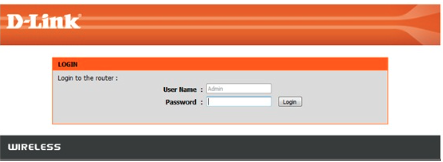
Enter your login information in the fields provided. The default username is Admin. Enter your administrator password. If you have not changed the default password, leave this field blank. Clink Login.
{% endstep %}
{% step %}
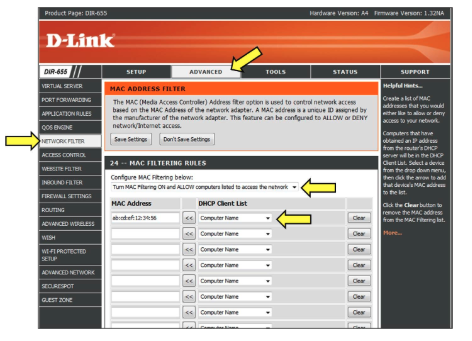
### Click on Advanced tab and then Network Filter on the left-hand side.
{% endstep %}
{% step %}
### From the Configure MAC Filtering drop down, select your method of MAC filtering.
**•** Turn MAC Filtering OFF\
• MAC Filtering ON and ALLOW computers listed to access the\
network.\
• MAC Filtering ON and DENY computers listed to access the network
{% endstep %}
{% step %}
### Select your computer from the List or enter the MAC addresses manually.
Click **Save Settings**
{% endstep %}
{% endstepper %}