> For the complete documentation index, see [llms.txt](https://support.dlink.com.sg/llms.txt). Markdown versions of documentation pages are available by appending `.md` to page URLs; this page is available as [Markdown](https://support.dlink.com.sg/consumer/wi-fi-router/dir-850l/faqs/how-to-setup-high-speed-broadband-for-malaysia-tm-unifi-maxis-fibre-home-for-dir-850l..md).
# How to setup High Speed Broadband for Malaysia ( TM Unifi / Maxis fibre Home ) For DIR-850L.
For Malaysia ONLY
{% stepper %}
{% step %}
### Connect Your PC (Laptop) to the Router (Port 1,2,3,4 either one of them) using Network cable.
{% endstep %}
{% step %}
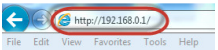
### Launch your IE (Internet explorer) and key in 192.168.0.1 in the address column and press Enter
{% endstep %}
{% step %}
### Enter your Username: admin and no password (if it is default) click on Log In
{% endstep %}
{% step %}
### You will see a D-Link configuration page, click on Setup > Internet > Manual Internet Connection Setup.
{% endstep %}
{% step %}
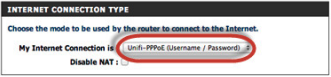
### For My Internet Connection select Unifi-PPPoE (Username / Password)
{% endstep %}
{% step %}
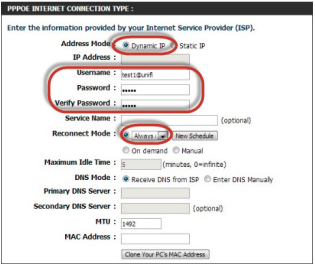
### Address Mode: Dynamic IP
### Username: Username provided by your ISP Password: Password provided by your ISP
{% endstep %}
{% step %}
Under VLAN Bridge, please enter the internet VLAN ID and IPTV VLAN ID, please check with your ISP for your VLAN ID
{% endstep %}
{% step %}
### Click on Save setting to complete internet setup.
{% endstep %}
{% endstepper %}