> For the complete documentation index, see [llms.txt](https://support.dlink.com.sg/llms.txt). Markdown versions of documentation pages are available by appending `.md` to page URLs; this page is available as [Markdown](https://support.dlink.com.sg/consumer/wi-fi-router/covr-c2202/faqs/covr-2202-how-to-set-up-network-with-covr-d-link-wifi-app.md).
# Covr-2202 – How to set up network with COVR(D-Link Wifi App)
{% stepper %}
{% step %}
### Download the D-Link Wi-Fi app from App store.
{% endstep %}
{% step %}
### Launch the D-Link Wi-Fi app
{% endstep %}
{% step %}
### Simply follow the on-screen instructions to complete the installation and the configuration process.
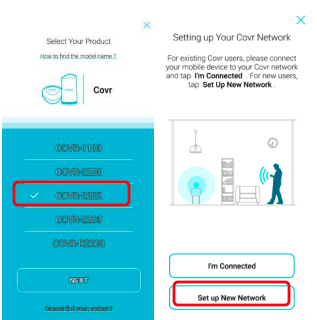
(1) Select **COVR-2202** from the list and tap **NEXT**.\
(2) Setup up New Network
(3) Simply follow the on-screen instructions to complete the installation and the configuration process.
(4) Please make sure phone is connect to covr wifi\
(5) Select the Internet Service Provider and choose other if the ISP was not in the list.\
(6) Select **NO** if don’t have ISP username and password
(7) Create your own wifi name and password\
(8) Set the device login password\
(9) Choose firmware upgrade automatically and click Next
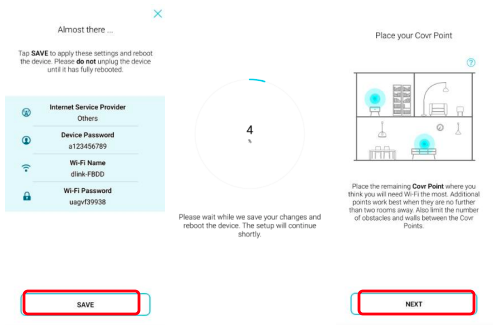
(10) Check the covr setting and click save\
(11) Wait the device save setting\
(12) Place the **Second Covr Point** at any location
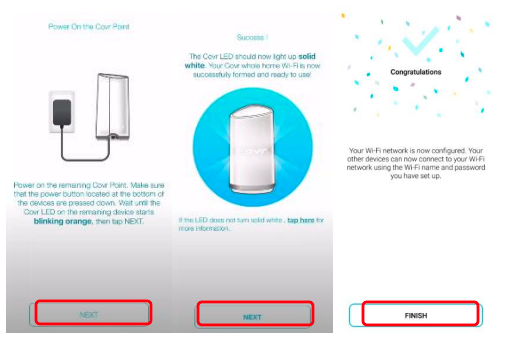
(13) Power on the second covr point and wait the device start working\
(14) If the device light up solid light then the second covr point is connect to main covr\
(15) Click finish after device completed setup
{% endstep %}
{% endstepper %}