> For the complete documentation index, see [llms.txt](https://support.dlink.com.sg/llms.txt). Markdown versions of documentation pages are available by appending `.md` to page URLs; this page is available as [Markdown](https://support.dlink.com.sg/consumer/aquila-pro-ai-wi-fi-6-router/m30/faqs/how-to-backup-restore-the-configuration-on-m30.md).
# How to backup restore the configuration on M30
{% stepper %}
{% step %}
Connect your computer or device to one of the router’s LAN ports using another ethernet\
cable or via Wi-Fi (By default, Password located on the label sticker at the back of the\
router)
{% endstep %}
{% step %}
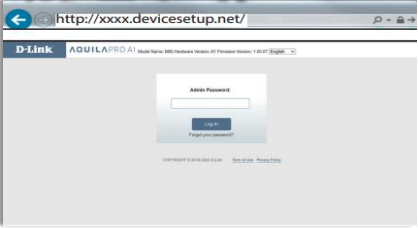
Open a web browser and enter into the browser (xxxx\
represents the last 4 digits of the MAC address) or . Enter the\
Admin Password and click login to start the configuration process.
The web address and default admin password are printed on the device label at the bottom of the device.
NOTE: If you have changed the password and cannot remember it, you will need to reset the\ router to factory defaults.
{% endstep %}
{% step %}
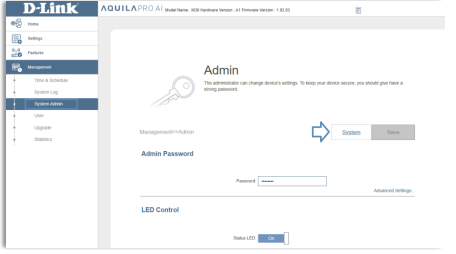
### Click Management > System Admin at the left corner of the screen, then click System.
{% endstep %}
{% step %}
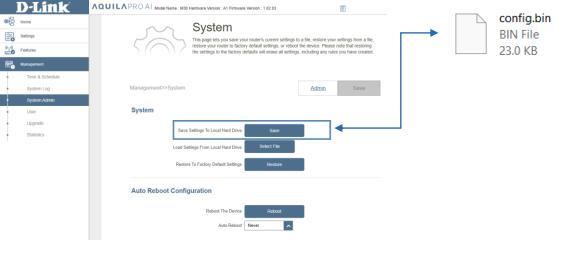
**Save Settings to Local Hard Drive** - Save the system settings in a file to the local hard\
drive. The configuration file will be saved in your browser’s download directory or to\
whatever download path your PC is set to.
{% endstep %}
{% step %}
**Local Settings from Local Hard Drive** - Select the system settings saved from your\
local hard drive. Then, click **Restore** that appears after the configuration file is selected\
to load the settings.
{% endstep %}
{% endstepper %}